Singapore — April 2016

23 years into my life, and I finally get to visit Singapore. My friend recently moved here for a job, so it was the perfect excuse to visit after a day of business in Shanghai. Here are some photos from the past week!

Continue Reading →

How to Host & Stream Music on Dropbox

In a previous post, I explained why hosting your music portfolio on SoundCloud isn’t a good idea. While I personally use Amazon’s S3 to host audio files for my portfolio, Dropbox is also a great (free) option. If you’re hosting music samples for a portfolio, you’ll probably want to use 320kbps MP3. I recommend staying away from uncompressed WAV and AIFF because Dropbox may ban your account if you receive a traffic spike. Once your music is in the correct format, upload it to Dropbox.

Continue Reading →

Why You Shouldn’t Use SoundCloud to Host a Music Portfolio

A music portfolio is all about sharing your creations with the world. Whether it’s to attract potential employers or just for fun, a portfolio should always represent your music at its best. In addition to a nice looking website, you also need to think about sound quality. I’ve seen a lot of people use SoundCloud to host their music portfolio. This is something you should never do. Why? Because SoundCloud encodes all your music to 128kbps MP3 for streaming.

Continue Reading →

How to Build Your First Home Recording Studio

Twenty years ago, building an affordable home studio was pretty much an impossible task. Since then, there has been lots of innovation in the music recording technology industry, and building your own personal home recording studio is no longer a pipe dream. Astronomically priced gear still exists, but building a decent home studio for $1,000 or less is completely doable. Before I go into more detail, here’s a list of things you’ll need for a basic studio setup.

Continue Reading →

Submixing With Aux & Patch Buses in MainStage

Submixing is a popular signal routing technique for both live and studio mixing. The general concept involves sending multiple signals to a “bus,” which can then be controlled by one fader. MainStage 3 makes it easy to submix with patch buses and auxiliary tracks. In this tutorial, you’ll learn why, how, and when you should submix in MainStage.

Continue Reading →

How to Insert Empty Bars in Logic Pro X

Inserting empty bars in Logic Pro X can be done in two ways. The first way is to manually select, cut, and move all the elements of your mix. The second and more efficient way is to just add time at a specific location, and Logic Pro X automatically cuts and moves your tracks. Here’s how to insert empty bars in Logic Pro X.

Continue Reading →

How to Fix Corrupt Concerts in MainStage 3.2

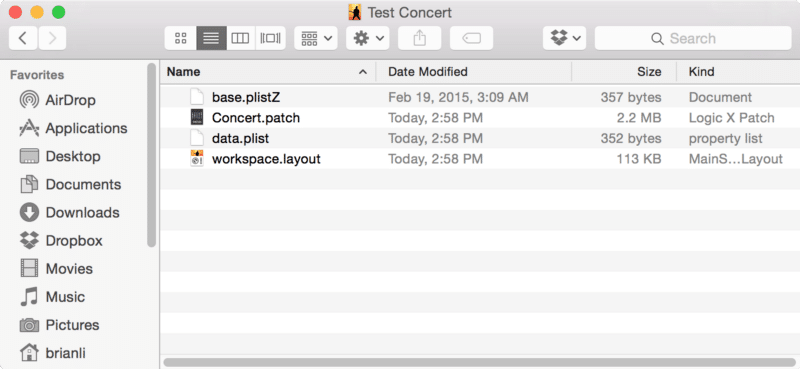
MainStage 3.2 introduced a new file hierarchy, and there is no longer a Nodes folder containing your patches. Instead, there is a new file called Concert.patch, which contains all of your sets and patches.To access the Concert.patch file, right click on your MainStage concert and click on Show Package Contents.mainstage-3-2-file-hierarchyThe two files that are important to us are Concert.patch and workspace.layout. As I mentioned earlier, Concert.patch contains all your patches and sets. Workspace.layout is your concert’s layout template.

Continue Reading →